Platform · Education ERP
Education ERP software for schools and colleges
Education ERP software brings the administration of a school or college into one system: admissions and student records, fees and finance, staff and payroll, timetable, transport, library and communication. AcademicsFlow covers all of these with one login per person and one subscription, for schools and colleges that work in classes with a weekly timetable.
- Students, finance and staff connected
- Transport and library included
- A documented REST API
What it does
The operations behind the school day.
What is education ERP software?
ERP stands for enterprise resource planning: running an organisation's core resources, such as money, people and operations, in one connected system instead of separate tools. In education, that usually means student records together with finance, staff and payroll, and day-to-day operations such as transport and the library.
No standard defines which modules an education ERP must include, and the label overlaps with “school management system” and “student information system”. Compare products by what they actually cover. The guide to the terms explains the differences.
What is the difference between an ERP and an LMS?
An ERP runs the institution. An LMS runs the teaching. They solve different problems and are usually separate products that share a student list.
| Education ERP | Learning management system | |
|---|---|---|
| Main job | Administration: records, finance, staff, operations | Teaching: content, assignments, quizzes, discussion |
| Main users | Office, finance, leadership, teachers, families | Teachers and students |
| Typical data | Students, invoices, payroll, timetables, attendance | Courses, lessons, submissions, grades on activities |
| AcademicsFlow | Yes. This is what it is. | Not a full LMS. See learning management system. |
What does AcademicsFlow cover?
| Area | Modules |
|---|---|
| Students | Admissions and enrolment, student records, attendance |
| Teaching | Timetable, coursework and marking, report cards and exams |
| Finance | Fee invoicing, online payments and reconciliation |
| People | Staff directory, leave and payroll |
| Operations | Transport and school bus, library, certificates and ID cards |
| Communication | Messages and notifications, family portal |
Every person gets a workspace for their role: principal, teacher, family, student, finance and office. All twelve modules are in one plan.
Why does connecting the modules matter?
The value of an ERP is not the number of modules. It is what stops being typed twice. When an application is enrolled, the student and guardian account are created together. When a register is saved, the same attendance rule feeds the dashboard, the family screen and the report card. When coursework is marked, the mark becomes evidence for the term report.
A second benefit is access. Because every module sits behind one set of role rules, a bursar sees salaries and a parent sees only their own children, and the server enforces both on every request, not only in the interface.
Can it connect to other systems?
Yes. Accounting packages, learning platforms, identity providers and fleet tracking are typical integrations, and AcademicsFlow exposes a documented REST API to build on. Integrations are quoted separately. See custom development.
How is it priced?
One plan, Essentials, with every module: $0.40 per enrolled student per month when billed yearly, in blocks of 100 students. Optional services such as data migration, training, SMS credits, extra storage and integrations are quoted separately and only if you want them. See the pricing page.
In the product
Real screens, not mock-ups.
Every image is the running product on a sample school.
- AcademicsFlow
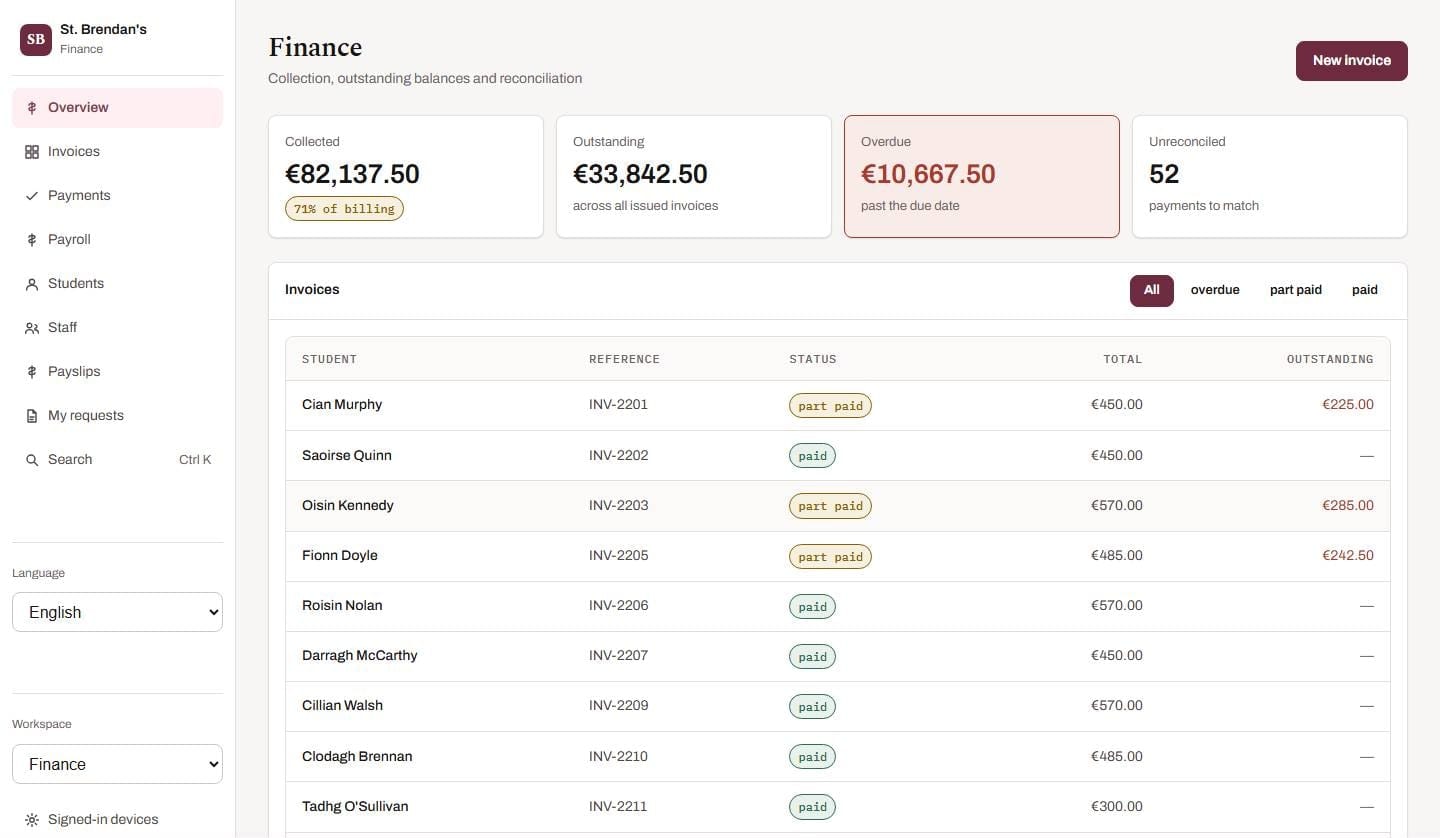
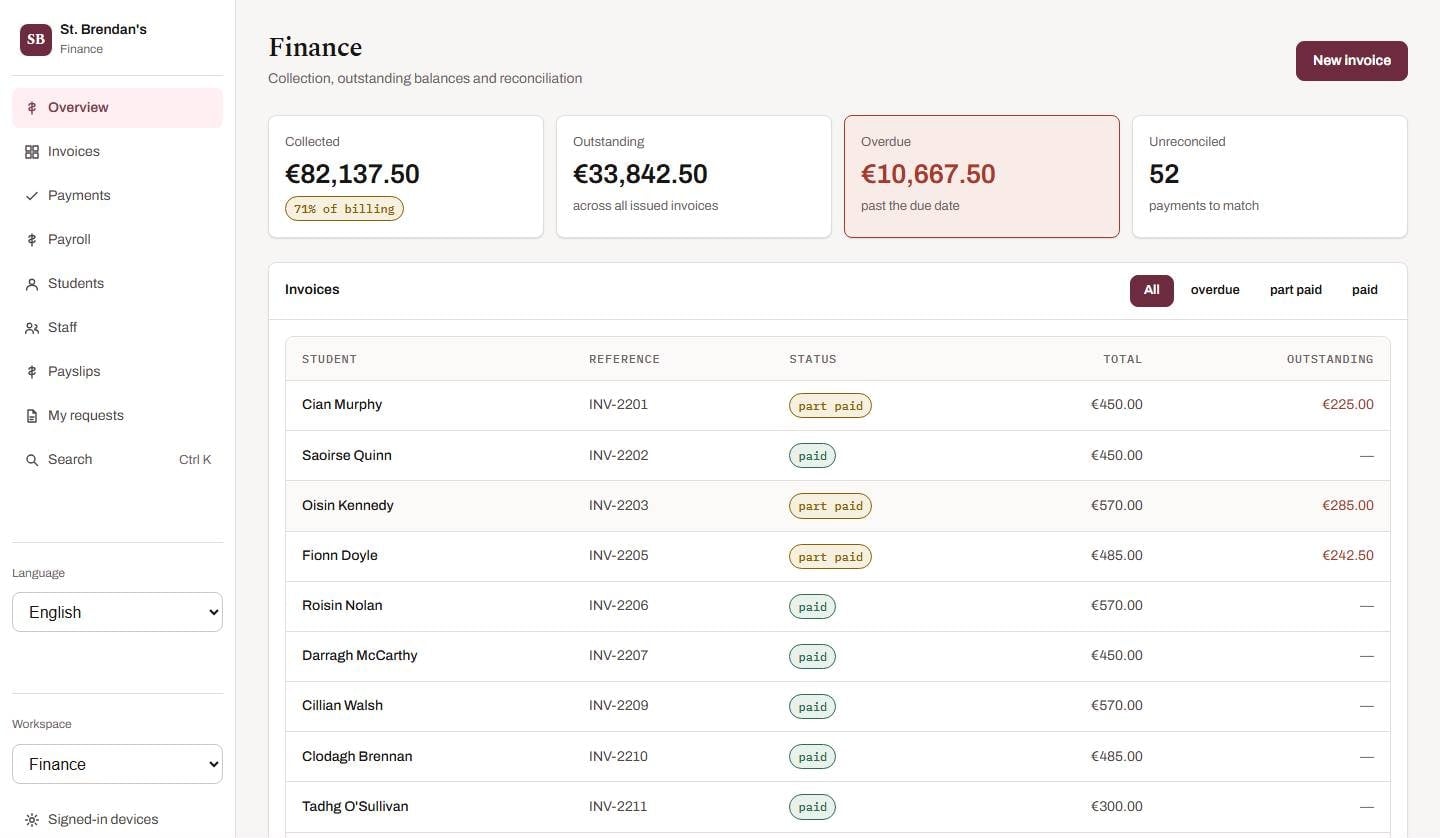
Finance: collected, outstanding, overdue and unreconciled, then every invoice. - AcademicsFlow
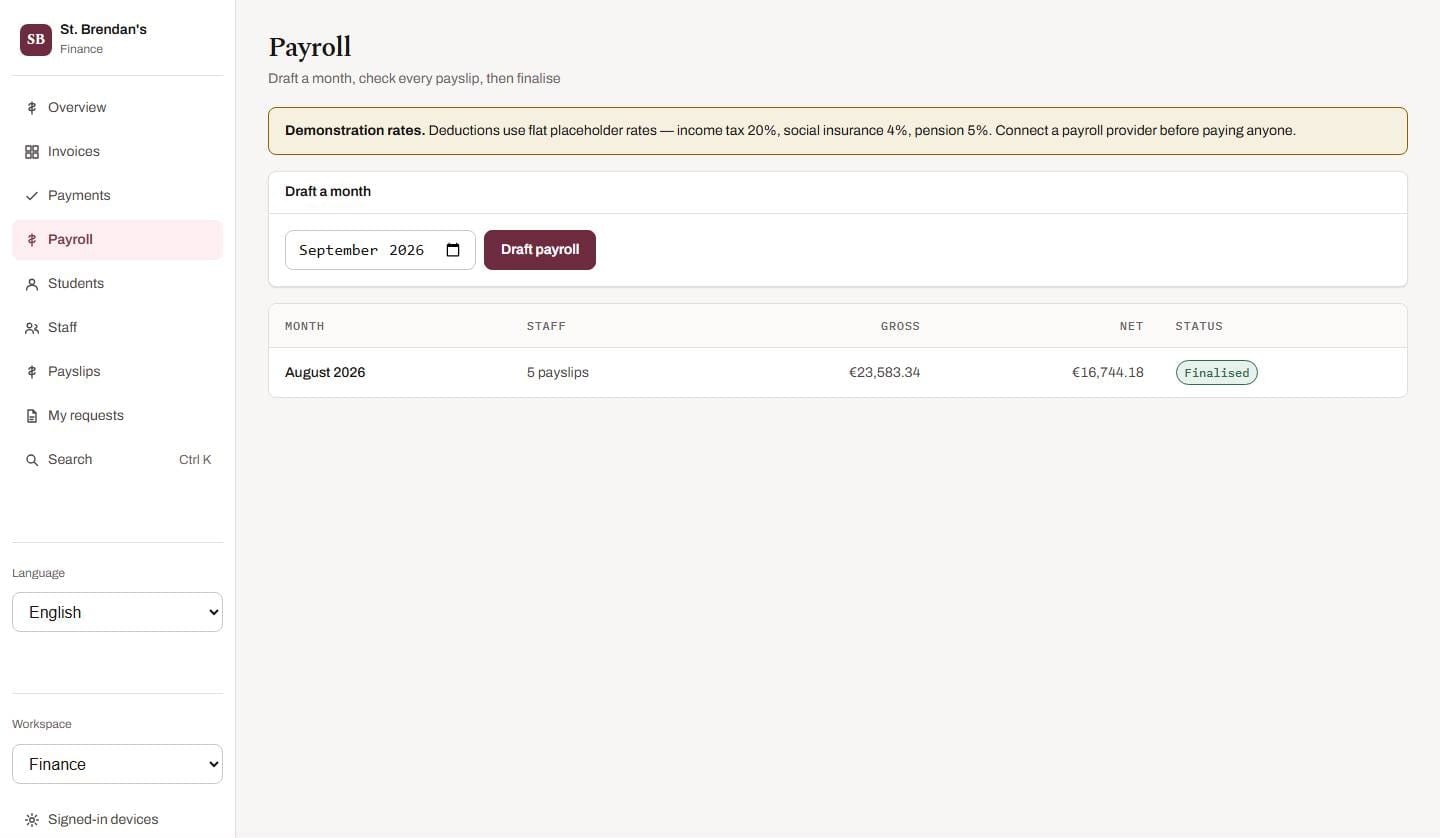
Payroll: draft a month, check every payslip, then finalise on purpose. - AcademicsFlow
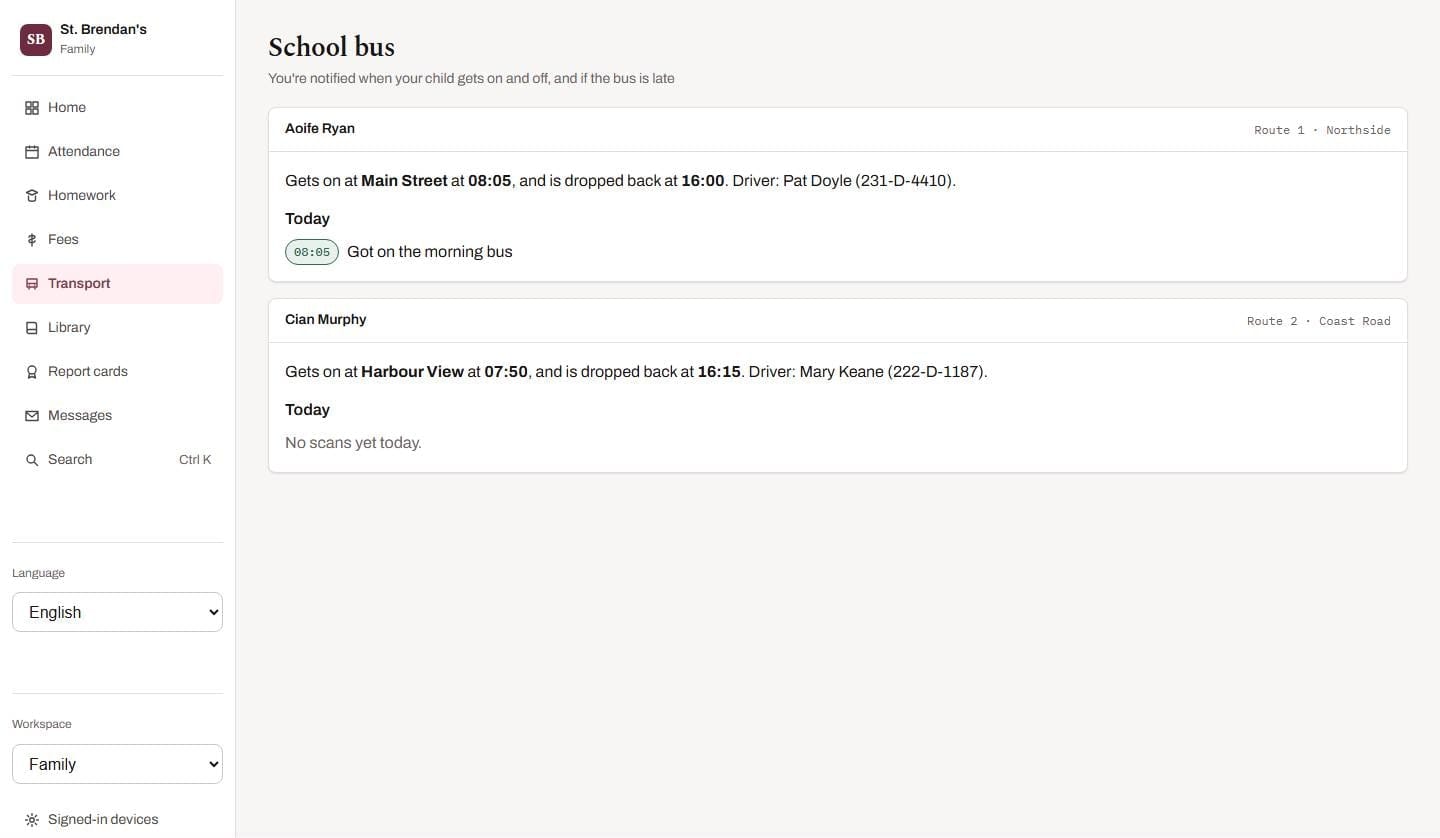
Transport: families see today's journeys, stop times and the driver.
Who benefits
One system, a different view for each person.
Administrators and finance staff
See collected, outstanding and overdue fees, reconcile payments, approve waivers, manage leave and run payroll without leaving the system.
Teachers
Take registers, set and mark coursework and comment on report cards, all against the same student record as the office uses.
Students
Read the timetable, hand in work and see feedback, with ID cards that can be checked and cancelled.
Parents and guardians
Pay fees, see attendance, check the school bus and renew library books from one account.
Examples
What it looks like in practice.
Illustrative scenarios built from how the product works. They are not customer stories.
A bursar closing the month
The situation
Fee payments, staff payroll and approvals all converge at month end, and each used to sit in a different file.
How AcademicsFlow helps
The finance overview shows what is collected and what is unmatched, leave and waiver approvals are in one queue, and payroll is finalised only after the month is typed to confirm.
A school running its own buses
The situation
A transport office must know who is on which bus, and families must hear when a bus is running late.
How AcademicsFlow helps
Attendants scan children on and off, even without signal, and a single delay notice reaches every family on the route through the channels they chose.
A library that families can use from home
The situation
Books go overdue because renewing meant a trip to the desk.
How AcademicsFlow helps
Families see what is out and when it is due, renew online, and receive an overdue reminder once a day.
What it does not do
Knowing the boundaries matters as much as knowing the features.
- It is not a full learning management system. It covers setting work, hand-in, marking and feedback, and can connect to the LMS you already use.
- It does not generate timetables automatically. It manages and validates the timetable you build, and refuses clashes.
- It has no built-in live GPS bus tracking. Boarding scans, rosters and delay notices are built in, and GPS can be integrated with your fleet system.
- Payroll tax rules are configured per country. Statutory rules differ, so they are set up for your jurisdiction during onboarding or as a custom module.
- The iOS and Android apps are coming soon. The web and desktop apps work today.
What is inside
The modules behind it.
Staff, Leave & Payroll
A private staff directory, leave that checks itself, and payroll you finalise on purpose.
Frequently asked questions
What is education ERP software?
Education ERP software runs a school's or college's core administration in one system: student records, fees and finance, staff and payroll, timetable, and operations such as transport and the library.
What is the difference between an education ERP and a school management system?
The terms overlap and no standard separates them. “ERP” usually stresses finance, staff and operations, while “school management system” stresses the school day. AcademicsFlow covers both.
What is the difference between an ERP and an LMS?
An ERP runs the institution's administration, such as records, finance and staff. A learning management system delivers teaching: content, assignments, quizzes and discussion. They are usually separate products that share a student list.
Does it include finance and payroll?
Yes. Fees and finance cover invoicing, online payments and reconciliation, and staff, leave and payroll cover the directory, leave requests and monthly payslips. Payroll tax rules are configured for your country.
Is it for colleges and universities?
It works for colleges that run on classes, a timetable, registers and term reports. It does not cover a university as a whole, which typically needs course registration and credit-hour structures. See the university management system page.
Can it integrate with our accounting software?
Integrations with accounting packages are a typical custom engagement, built on a documented REST API. Tell us which package you use and we will scope it.
Keep exploring
- Student Information SystemThe system of record for enrolment, guardians, attendance and grades.
- Fee Management SoftwareInvoices, online payments and reconciliation, with no card data on your servers.
- Learning Management SystemHow an LMS differs from school software, and what AcademicsFlow covers for coursework.
- College Management SoftwareFor colleges that run on classes, a weekly timetable, registers and term reports.
Related reading
See AcademicsFlow running a school like yours.
Book a live walkthrough with a fully populated sample school — or tell us what you need and we'll put together a proposal.
Prefer email? info@academicsflow.com