Platform · Learning management
Learning management system (LMS) and school software: what AcademicsFlow covers
A learning management system (LMS) delivers teaching: course content, assignments, quizzes and discussion. AcademicsFlow is not a full LMS. It is school management software that includes the learning side schools need every day: setting coursework, student hand-in, marking, feedback to families and marks that feed report cards. If you need a full LMS, use one alongside it.
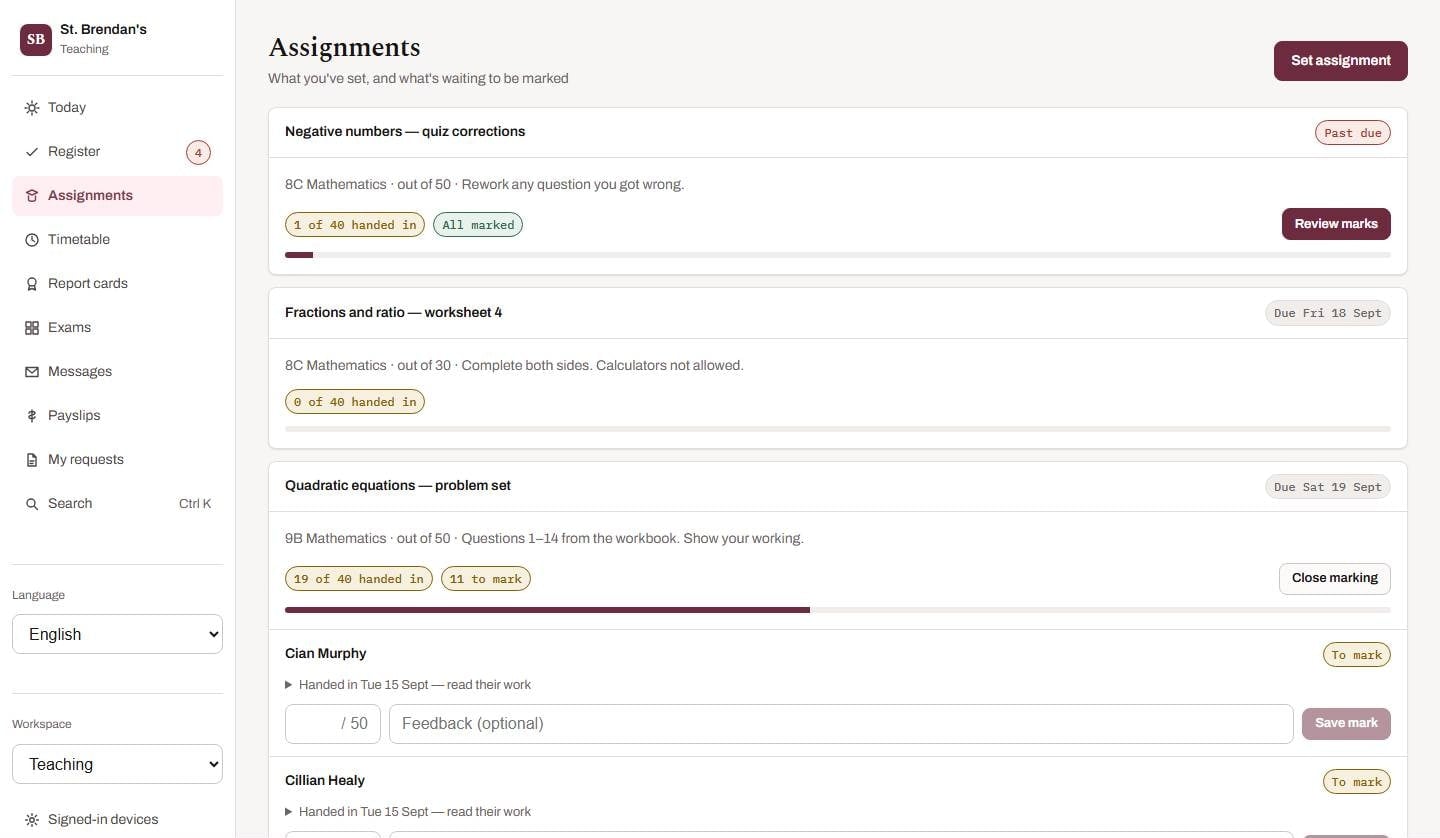
What it does
The learning side of school software.
What is a learning management system?
A learning management system (LMS) is software for delivering and managing teaching. Typically a teacher builds a course with lessons and materials, sets assignments and quizzes, students work through them online, and the LMS records progress and grades on those activities. Discussion forums and live-class links are common additions.
An LMS does not usually run a school's administration. It does not issue fee invoices, run payroll or take the register, and most expect the school to supply the list of students from elsewhere.
What is the difference between an LMS, an SIS and an ERP?
| System | What it manages | Typical features | In AcademicsFlow |
|---|---|---|---|
| Learning management system (LMS) | Teaching and learning | Course content, assignments, quizzes, discussion | Coursework, hand-in, marking and feedback only |
| Student information system (SIS) | The student record | Enrolment, attendance, grades, contacts | Yes |
| Education ERP | Resources and operations | Finance, staff and payroll, transport, library | Yes |
| School management system | Running the whole school | An SIS plus fees, staff, timetable and communication | Yes. This is what it is. |
Many schools use an LMS and a school management system together, with the school management system as the source of the student list. The article on the difference between an LMS and a school ERP goes through it in more detail.
What does AcademicsFlow cover for learning?
| Capability | In the standard product |
|---|---|
| Set assignments with marks available and a due date | Yes |
| Students hand in text and files, including a phone photograph | Yes |
| Mark each student's work with feedback | Yes |
| Show marks and feedback to the student and their guardians | Yes, and only to them and the marking teacher |
| Use marked work to pre-fill report cards | Yes |
| Timetable and a teacher's Today view | Yes |
| Course content, lessons and a resource library | No |
| Quizzes and question banks | No |
| Discussion forums | No |
How do you use an LMS with AcademicsFlow?
The usual pattern is to keep AcademicsFlow as the record of who your students are, who their guardians are and how they are getting on, and to use your LMS for the teaching content. Connecting the two, for example so that a new student appears in both, is an integration built on AcademicsFlow's documented REST API and quoted separately. Tell us which LMS you use and we will scope it. See custom development.
If you do not yet use an LMS, the coursework module may be all you need for setting work, collecting it and returning marks, and the full-platform choice can wait.
What does it cost?
Coursework is part of the one plan, Essentials, which includes every module: $0.40 per enrolled student per month when billed yearly. See the pricing page.
In the product
Real screens, not mock-ups.
Every image is the running product on a sample school.
- AcademicsFlow
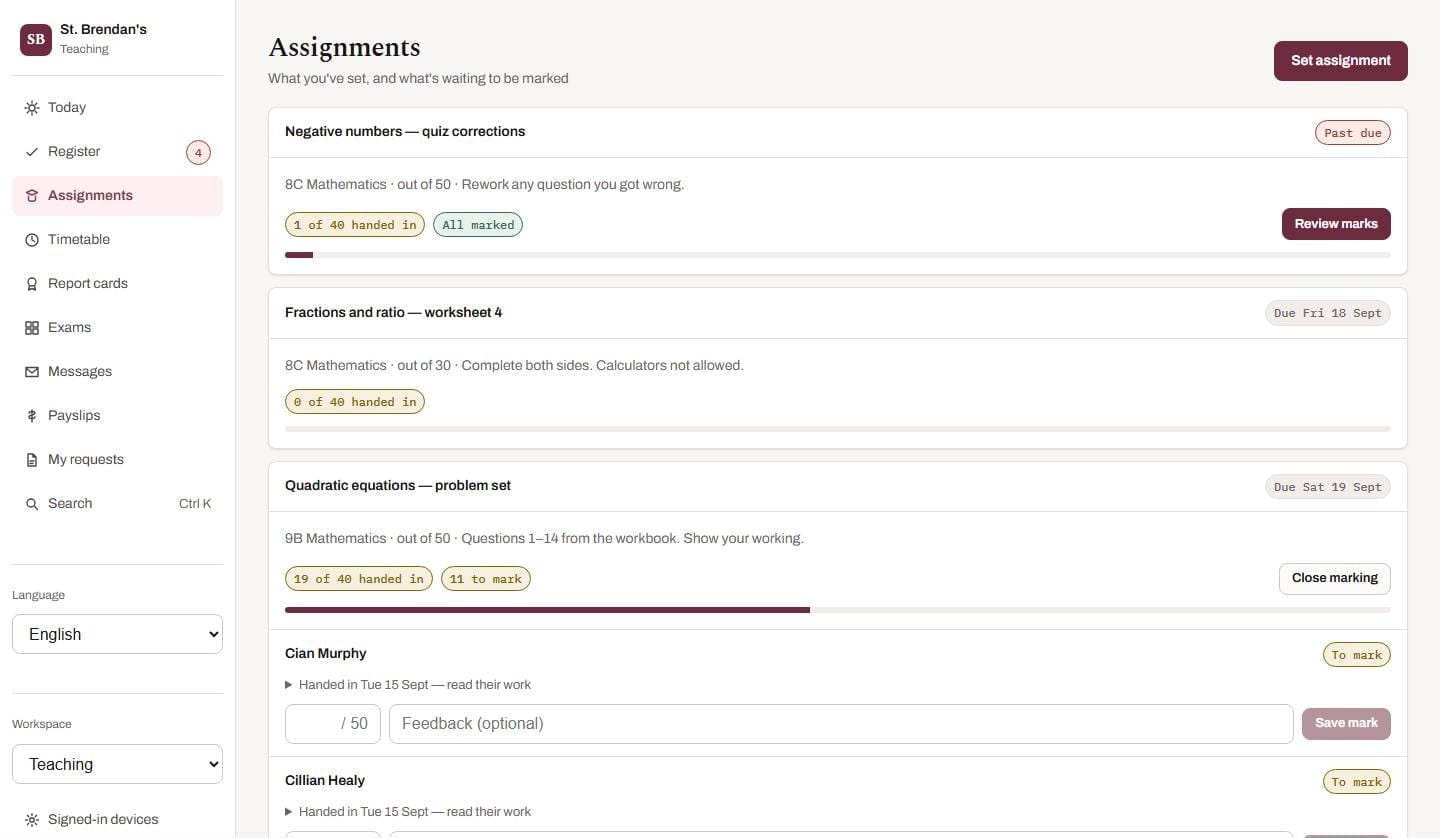
Handed in, marked, fed back: the whole trail on one screen. - AcademicsFlow
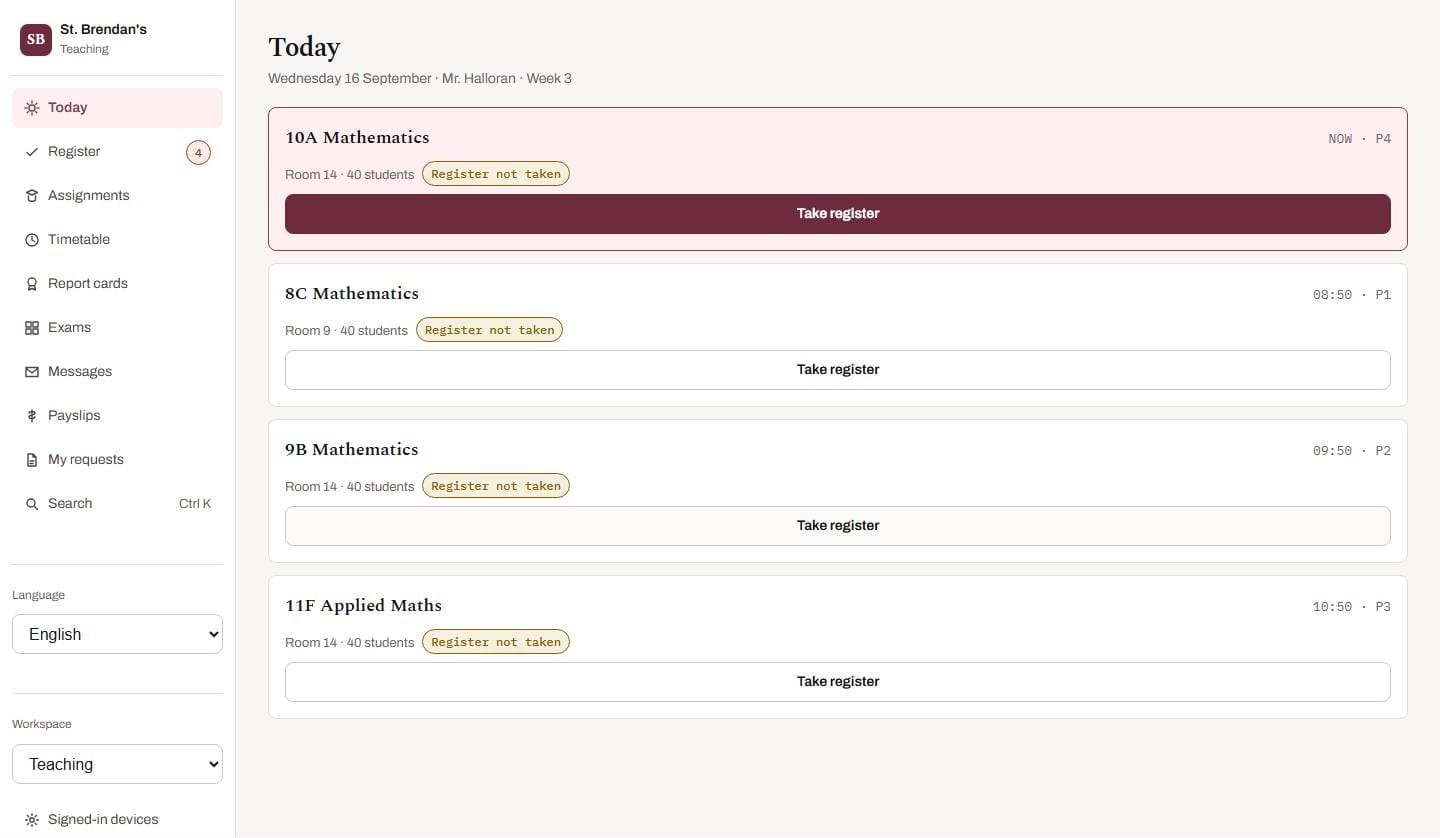
A teacher's Today view, with the register one tap from each lesson. - AcademicsFlow
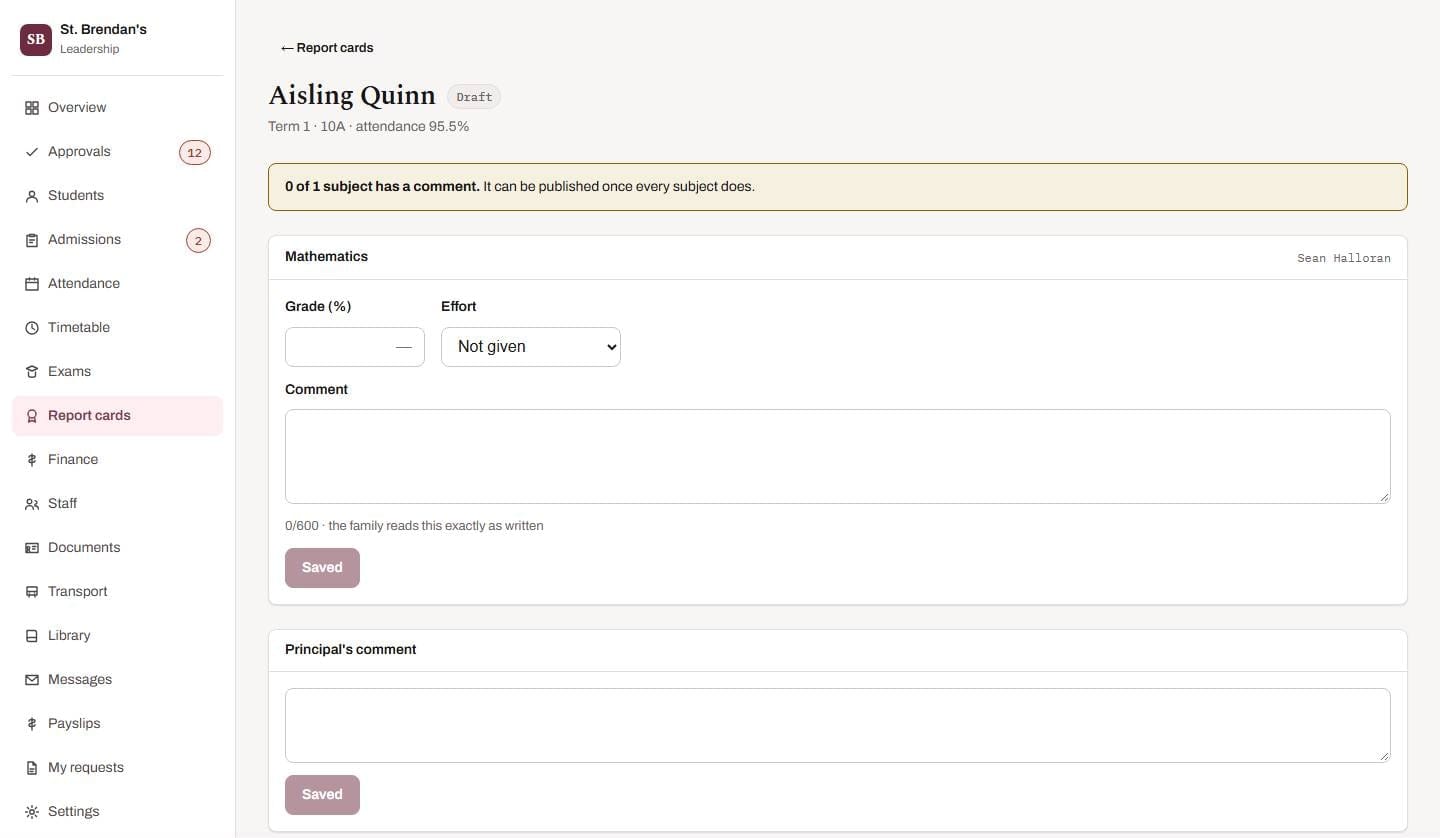
Marked work pre-fills the report card draft.
Who benefits
One system, a different view for each person.
School leaders
See that coursework is being set and marked, and that report cards are built from marked work rather than retyped.
Teachers
Set work, see who has handed in, mark with feedback, and know the mark reaches the report and the family.
Students
Hand in a document or a photograph from your phone, and read feedback when it is released.
Parents and guardians
See how work is going without waiting for parents' evening, with access limited to your own child.
Examples
What it looks like in practice.
Illustrative scenarios built from how the product works. They are not customer stories.
Homework handed in from a phone
The situation
A pupil finishes handwritten work at the kitchen table and needs to hand it in before school.
How AcademicsFlow helps
They photograph the page and submit it. The teacher sees the hand-in on the assignment's progress bar and marks it with feedback.
A teacher who already uses an LMS
The situation
A school's teachers use a learning platform for lessons and want the school system to stay the record of students.
How AcademicsFlow helps
AcademicsFlow remains the student record and the source of the report cards. Connecting it to the LMS is scoped as an integration.
Feeding the term report
The situation
At the end of term, a teacher writes subject comments for 120 pupils.
How AcademicsFlow helps
The drafts start from each pupil's marked work for the term, so the teacher edits evidence rather than inventing it.
What AcademicsFlow does not include as a learning platform
If these are central to what you need, an LMS is the right tool, and the two can work side by side.
- Course content, lesson authoring and a resource library.
- Quizzes, question banks and automatic marking.
- Discussion forums and live-class tools.
- A ready-made connection to a specific LMS. Integrations are custom and quoted separately.
What is inside
The modules behind it.
Mobile Apps & Family Portal
iOS and Android apps, coming soon, that extend the platform rather than duplicate it.
Frequently asked questions
What is a learning management system?
A learning management system (LMS) is software for delivering teaching: course content, assignments, quizzes and discussion, with records of progress and grades on those activities.
Is AcademicsFlow a learning management system?
No. It covers setting coursework, student hand-in, marking, feedback and using marks in report cards. It does not include course content authoring, quizzes or forums.
What is the difference between an LMS and an ERP?
An education ERP runs the institution's administration: records, finance, staff and operations. An LMS runs teaching. They are usually separate products that share a student list.
What is the difference between an LMS and an SIS?
A student information system holds the student record: enrolment, guardians, attendance and grades. An LMS delivers the lessons and records activity within them.
Can AcademicsFlow work with the LMS we already use?
Yes, as an integration. AcademicsFlow has a documented REST API, and connecting it to your LMS is quoted separately. Tell us which one you use.
Can students hand in work from a phone?
Yes. Students can submit text and files, including a photograph from their phone, on the web today. The native iOS and Android apps are coming soon.
Keep exploring
- College Management SoftwareFor colleges that run on classes, a weekly timetable, registers and term reports.
- University Management SystemWhat fits a university today, what does not, and how to scope the rest with us.
- Student Information SystemThe system of record for enrolment, guardians, attendance and grades.
- Education ERP SoftwareStudents, finance, staff, transport and the library in one connected system.
Related reading
See AcademicsFlow running a school like yours.
Book a live walkthrough with a fully populated sample school — or tell us what you need and we'll put together a proposal.
Prefer email? info@academicsflow.com