Platform · Fee management
Fee management software for schools and colleges
Fee management software issues fee invoices, collects payments, reconciles them and shows who owes what. AcademicsFlow invoices by student, opens the payment provider's own hosted page for online payment (so card details never reach the school's systems), reconciles payments against invoices, and shows collected, outstanding, overdue and unreconciled totals on one screen.
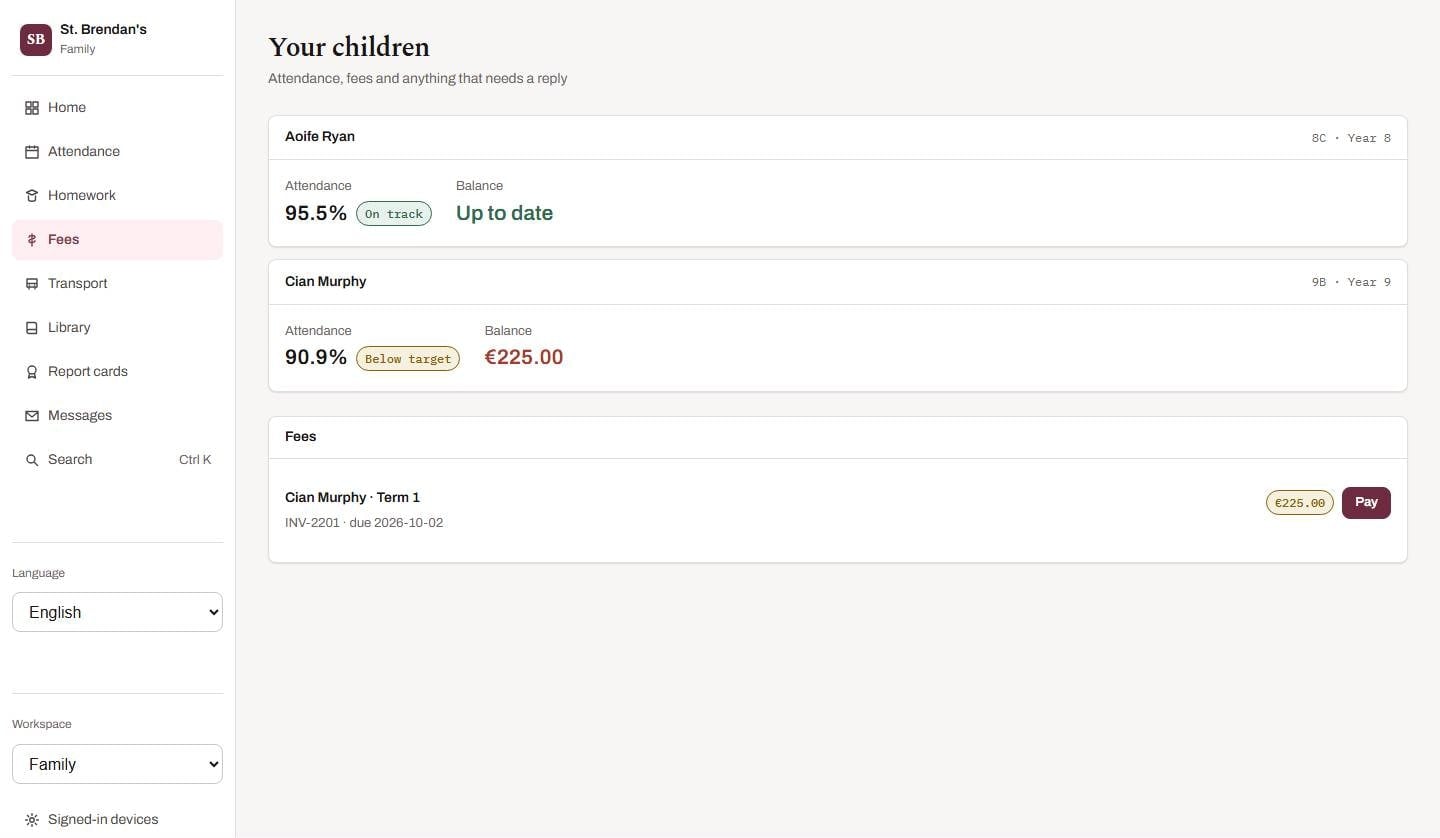
What it does
From invoice to reconciliation.
What is fee management software?
Fee management software is the part of a school's or college's administration that deals with money from families. It raises invoices against students, lets families pay, records and matches each payment, and shows the school what has been paid, what is owed and what is late.
It can be a stand-alone tool or a module of a wider system. In AcademicsFlow it is the Fees and Finance module, and it works from the same student records as admissions and attendance, so a new student is invoiceable the day they are enrolled. See the education ERP page for how it connects to payroll and the rest.
How does the fee cycle work in AcademicsFlow?
| Stage | What the school does | In AcademicsFlow |
|---|---|---|
| 1. Invoice | Raises a fee invoice for each student | Invoices by student, each with a status: paid, part paid or overdue |
| 2. Notify | Tells families what is due | Families see their balance in their account, and the school can message them through the channels they chose |
| 3. Pay | Collects payment from the family | One tap opens the payment provider's hosted page |
| 4. Record | Matches the payment to the invoice | The payment is recorded once, whatever the connection does |
| 5. Reconcile | Checks that money received matches invoices | Payments reconcile against invoices, and unmatched money shows as unreconciled |
| 6. Follow up | Chases what is late | Filter the invoice list by status and work from one list |
| 7. Exceptions | Handles waivers and special cases | Routed to the principal for approval |
What are the four numbers on the finance overview?
| Figure | What it means |
|---|---|
| Collected | Money received and matched to invoices |
| Outstanding | Invoiced and not yet paid |
| Overdue | Outstanding and past its due date |
| Unreconciled | Money that has arrived but has not yet been matched to an invoice |
A bursar checks these four first, which is why the overview leads with them. The longer article on how to collect school fees on time covers the practices that keep the overdue figure small.
How does online fee payment stay safe?
Online payment should go through the payment provider's own secure page. When a family pays, AcademicsFlow opens that hosted page, so card details are entered with the provider and never reach the school's systems. The result is recorded against the invoice.
Each payment is idempotent. If a parent taps twice or the connection drops and retries, the family cannot be charged twice. The school connects the payment provider that fits its country as part of onboarding, so tell us which you use. Payment providers normally charge their own fees, which are separate from the AcademicsFlow subscription.
What about instalments, sibling discounts and other currencies?
The invoice currency is set per school, and multi-currency display and local payment providers are configured during onboarding. More complex fee structures, such as sibling discounts, instalments and term-based billing, can be added as a custom change. Describe how your fees work and we will say plainly what is standard and what is custom. See custom development.
What does it cost?
Fee management is part of the one plan, Essentials, with every module: $0.40 per enrolled student per month when billed yearly, in blocks of 100 students. See the pricing page.
In the product
Real screens, not mock-ups.
Every image is the running product on a sample school.
- AcademicsFlow
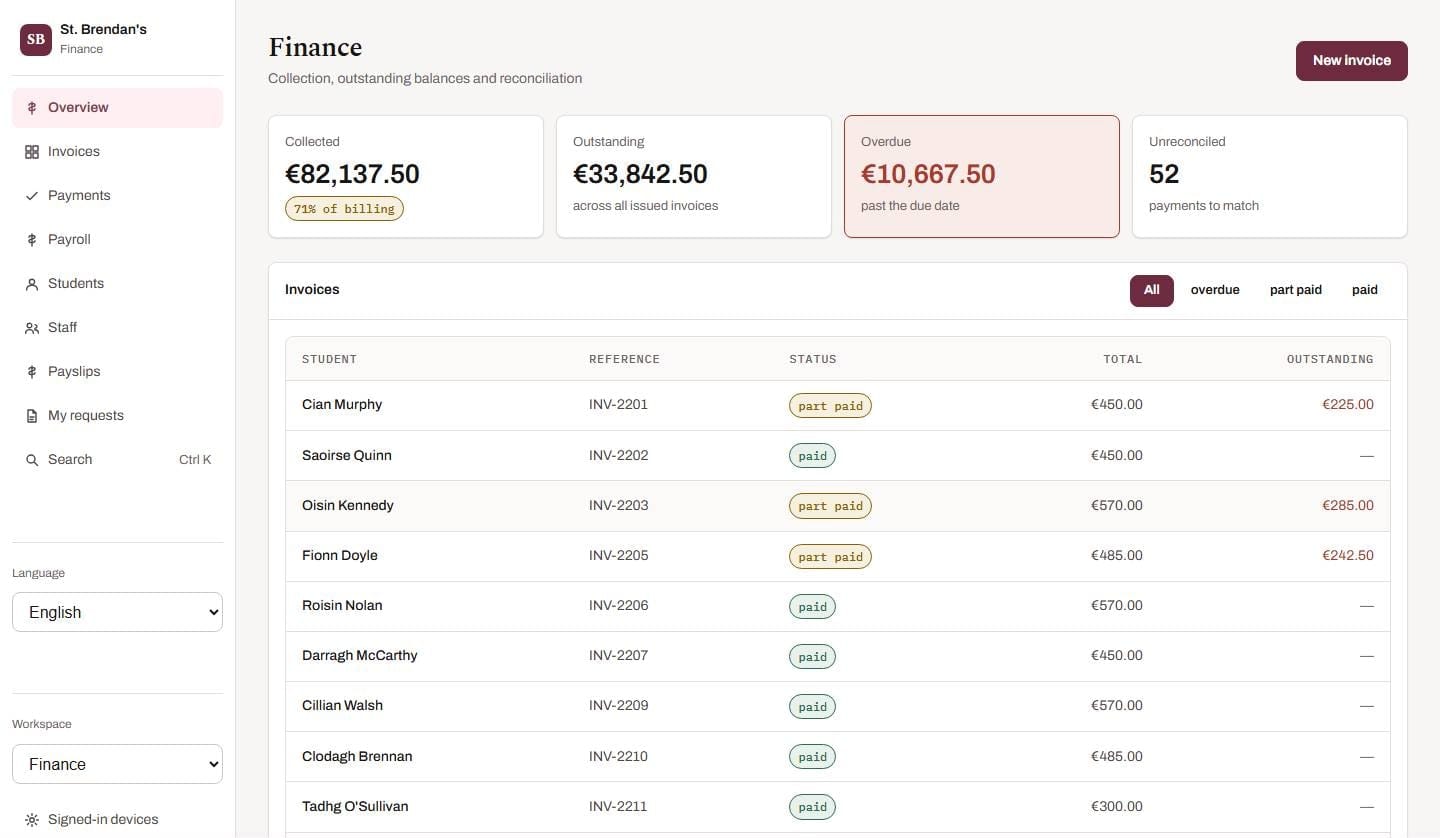
Collected, outstanding, overdue and unreconciled, then every invoice. - AcademicsFlow
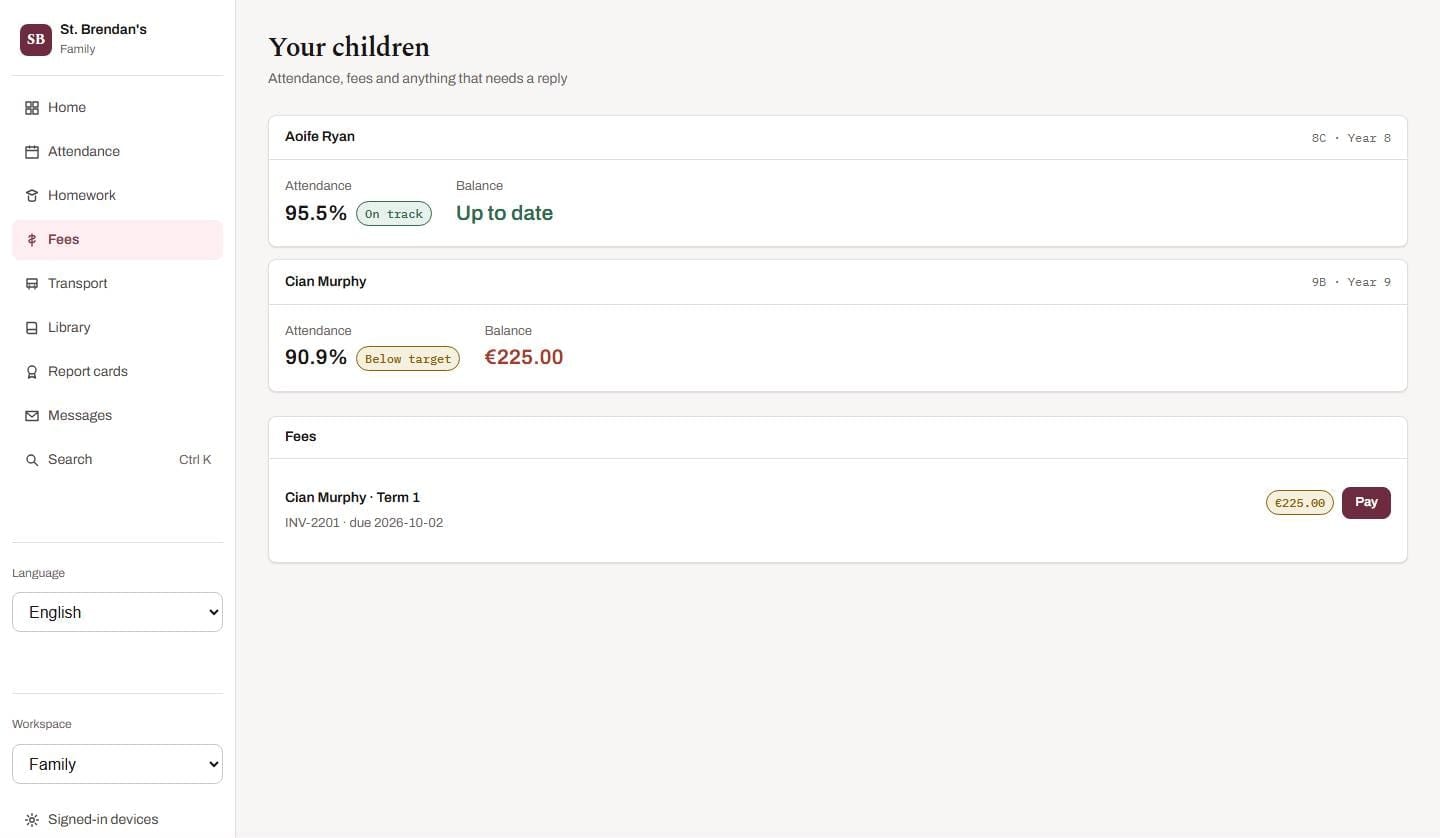
Families see what is due and pay in one tap.
Who benefits
One system, a different view for each person.
Bursars and finance staff
Reconcile faster and chase overdue balances from a single filtered list, with unmatched payments shown separately.
Principals
Approve fee waivers from the same queue as leave and offers, and see collection at a glance.
Parents and guardians
See the balance for each child and pay on a phone through the provider's secure page.
Students
Where students pay their own fees, as in some colleges, the same hosted payment page applies.
Examples
What it looks like in practice.
Illustrative scenarios built from how the product works. They are not customer stories.
Invoicing at the start of term
The situation
Every student must be invoiced for the term, and the office has done it by hand in a spreadsheet.
How AcademicsFlow helps
Invoices are created per student against the enrolled record, each carries a status, and families see their balance as soon as it is issued.
A parent paying at the school gate
The situation
A parent remembers the fee while waiting for pickup and wants to pay on their phone.
How AcademicsFlow helps
They open their account, see the balance and tap Pay. The provider's hosted page takes the card details, and the invoice updates once.
The bursar's Monday check
The situation
Money arrived over the weekend and some of it cannot be matched to a student.
How AcademicsFlow helps
The overview shows the unreconciled total, the bursar matches payments to invoices, and the overdue list shows who to follow up.
A fee waiver request
The situation
A family asks for part of a fee to be waived.
How AcademicsFlow helps
The waiver goes to the principal's approvals queue, so the decision is recorded and made by the right person.
What to know before you choose
Where the standard product stops.
- Complex fee structures, such as sibling discounts, instalments and term-based billing, are custom changes.
- Payments run through your provider's hosted checkout. We connect the provider that fits your country during onboarding, so confirm yours with us first.
- Payment-provider fees are charged by the provider and are separate from the AcademicsFlow subscription.
- It does not replace a full accounting package. Integrations with accounting software are custom and quoted separately.
What is inside
The modules behind it.
Staff, Leave & Payroll
A private staff directory, leave that checks itself, and payroll you finalise on purpose.
Frequently asked questions
What is fee management software?
Fee management software raises fee invoices for students, lets families pay, records and matches payments, and shows what has been collected, what is owed and what is overdue.
How can a school collect fees online safely?
Use a payment provider's hosted checkout, so card details are entered on the provider's page and not the school's. AcademicsFlow opens that page for families and records the result against the invoice.
What does “unreconciled” mean?
An unreconciled payment is money that has arrived but has not yet been matched to an invoice. AcademicsFlow shows the unreconciled total on the finance overview so it can be cleared.
Can a parent be charged twice?
No. Payment intents are idempotent, so a double-tap or a retry on a poor connection cannot charge a family twice.
Does it support sibling discounts and instalments?
Not in the standard product. Sibling discounts, instalments and term-based billing can be added as a custom change. Tell us how your fees work and we will scope it.
Which payment providers do you support?
Payments run through your provider's hosted checkout. We connect the provider that fits your country as part of onboarding. Tell us which you use and we will confirm.
Keep exploring
- School Management SoftwareAdmissions, registers, timetables, report cards and fees for primary and secondary schools.
- College Management SoftwareFor colleges that run on classes, a weekly timetable, registers and term reports.
- University Management SystemWhat fits a university today, what does not, and how to scope the rest with us.
- Education ERP SoftwareStudents, finance, staff, transport and the library in one connected system.
Related reading
See AcademicsFlow running a school like yours.
Book a live walkthrough with a fully populated sample school — or tell us what you need and we'll put together a proposal.
Prefer email? info@academicsflow.com