Solutions · Schools
School management software for the whole school year
AcademicsFlow is school management software that runs a school's daily administration in one system: admissions and student records, attendance, timetables, coursework and report cards, fees, buses, staff and payroll, and messages to families. Every person gets a workspace for their role, and one subscription includes every module.
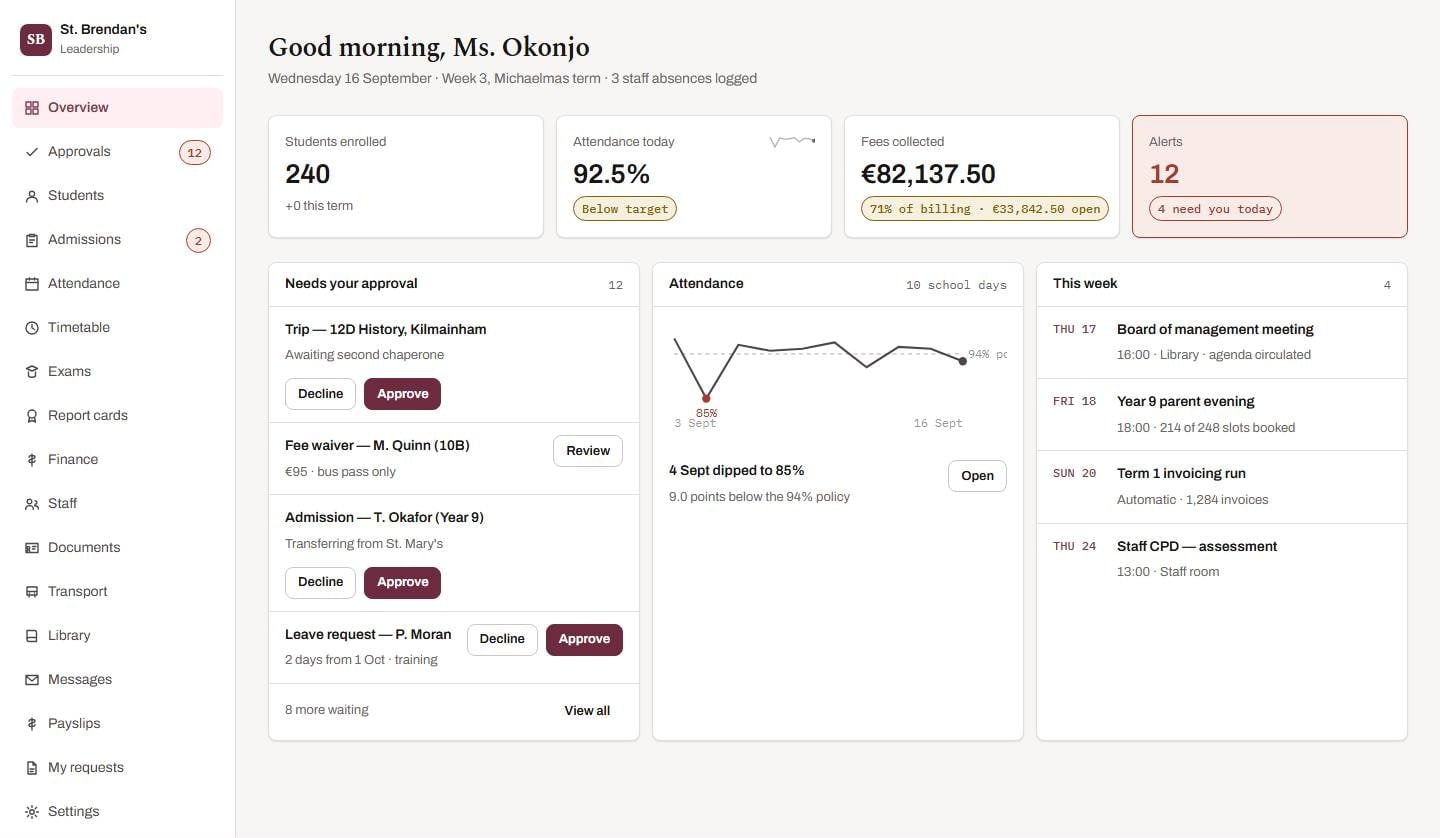
What it does
Six jobs it does every day.
What is school management software?
School management software is a system that handles a school's administration in one place, so that a student's details, attendance, grades and fees are recorded once and used everywhere. Without it, the same information tends to live in several spreadsheets, a paper register and a finance package, and somebody retypes it.
The names overlap. A student information system centres on the student record, an education ERP stresses finance, staff and operations, and a learning management system delivers lessons. A school management system is the broad one: it joins the first two and sits beside the third. The guide to the terms compares them in more detail.
How does it support a school year?
The useful way to judge school software is to follow a year and ask which job each part does. Here is how AcademicsFlow lines up with the rhythm of a school.
| When | What the school is doing | Where it happens in AcademicsFlow |
|---|---|---|
| Before term | Taking applications, making offers, enrolling pupils and building the timetable | Admissions, a spreadsheet import for returning students, and the timetable |
| Every day | Taking registers, sending notices, running buses and lending library books | Attendance, communication, transport and the library |
| Every week | Setting, handing in and marking work, and adjusting the timetable | Coursework and marking and the timetable's clash checks |
| Every month | Chasing fees and running staff payroll | Fees and finance and staff, leave and payroll |
| Every term | Writing and publishing report cards | Report cards and exams, pre-filled from the term's marked work |
| Year round | Issuing certificates and ID cards | Certificates and ID cards, numbered and cancellable |
What kind and size of school is it for?
AcademicsFlow is built around students in classes with a weekly timetable, which covers primary and secondary schools, international schools and independent schools. See how it is used by international schools, primary and secondary schools, small and independent schools and school groups and trusts.
It is priced per enrolled student and sold in blocks of 100 students, with a minimum of 100, so a school of any size pays the same rate. Past 5,000 students, or for a group of schools, talk to us. Colleges that work like schools are covered on the college management software page.
How do you choose school management software?
Start from your own school rather than from a feature list. Four checks separate products that look alike in a demo:
- Does the register survive a bad connection? Switch the network off in the demo and see whether it arrives once. See offline attendance.
- Who can see which child's data? Access should be enforced by the server on every request. The student data privacy checklist lists the questions.
- Does it read in your families' languages? Right-to-left support means mirroring the whole layout. See the right-to-left checklist.
- What is the whole price? Compare quotes on the same scope, with every extra included. The cost guide shows how.
What does it cost?
There is one plan, Essentials, with every module: $0.40 per enrolled student per month when billed yearly. That is $475.20 a year before tax for 100 students. The pricing page calculates the exact price for your school.
In the product
Real screens, not mock-ups.
Every image is the running product on a sample school.
- AcademicsFlow
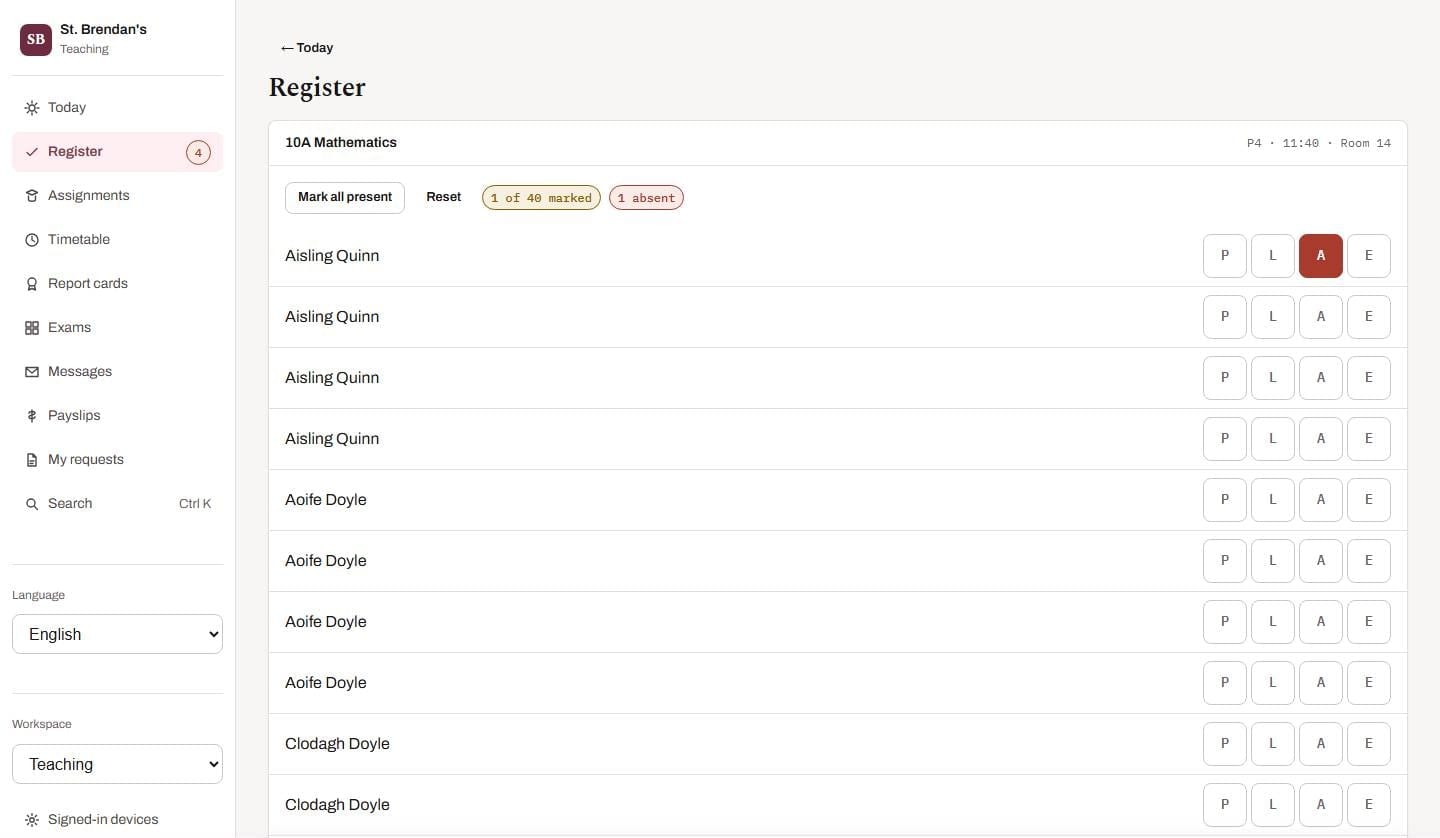
The register opens with everyone present. A teacher marks only the exceptions. - AcademicsFlow
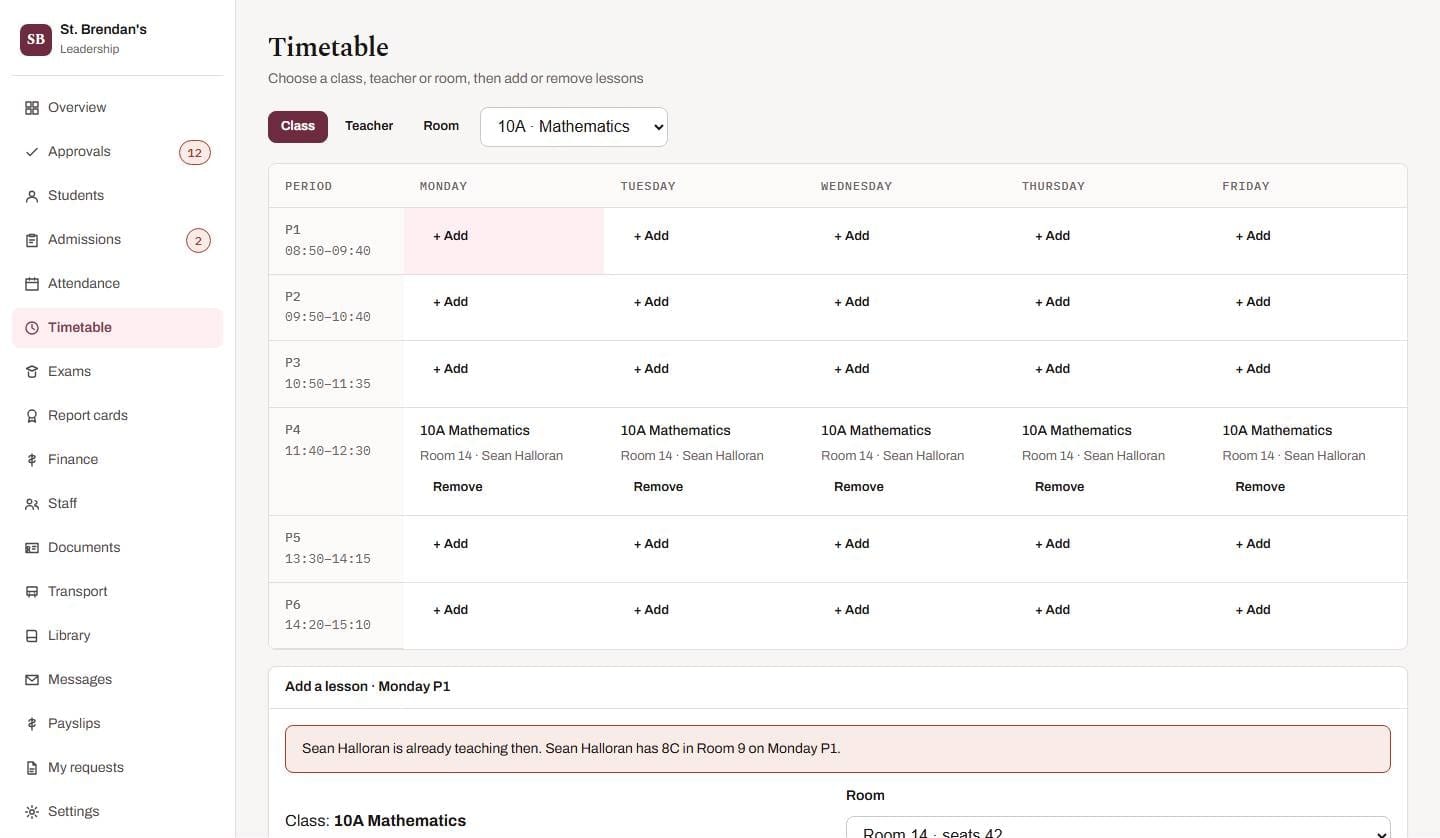
A double-booked teacher is refused, and the message names the clashing class. - AcademicsFlow
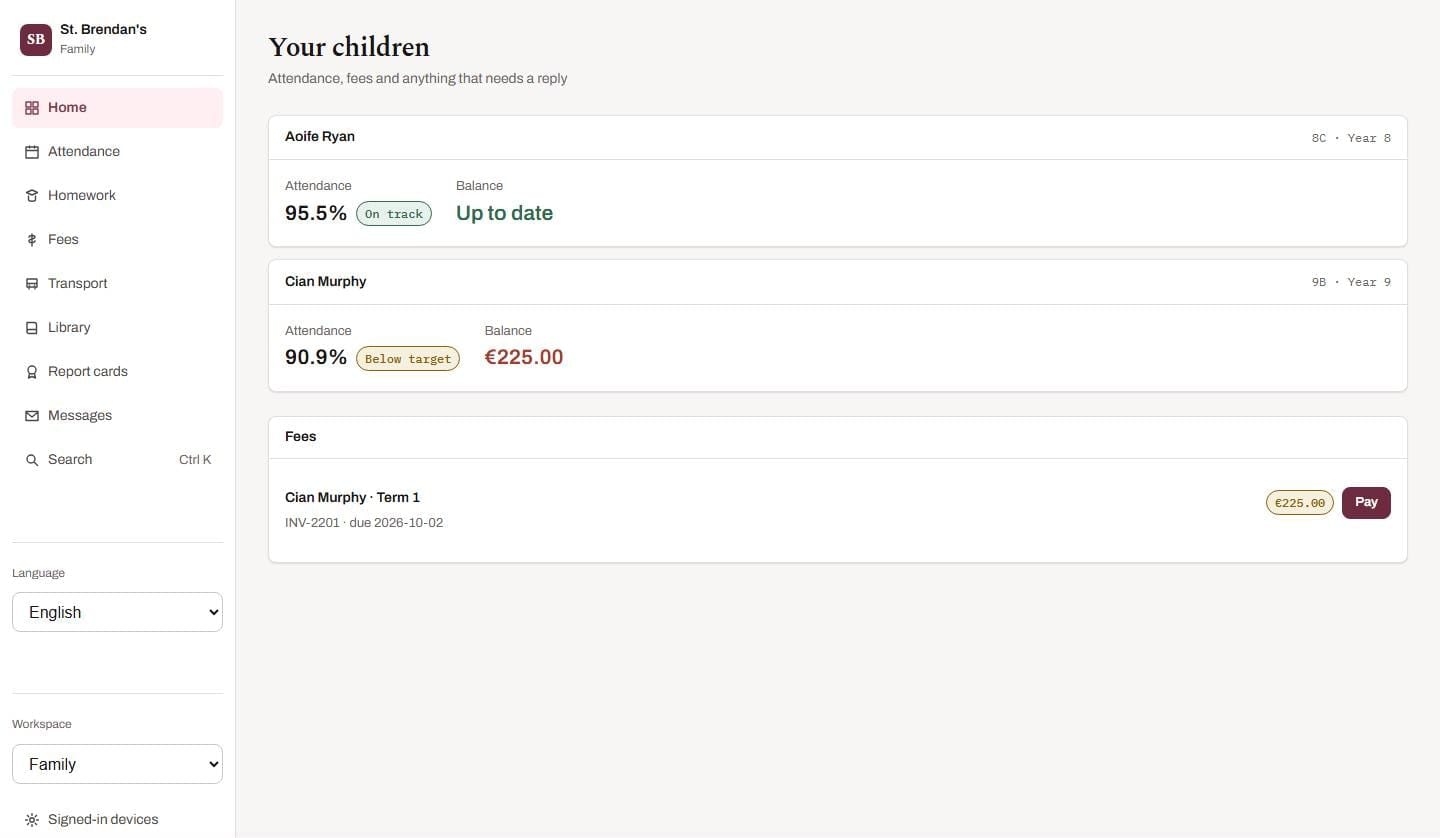
A family sees its own children and nothing else, decided by the server on every request.
Who benefits
One system, a different view for each person.
Principals and office staff
One dashboard opens on what needs you today: approvals, attendance that has slipped and fees outstanding. Applications, leave requests and fee waivers arrive in the same approvals queue.
Teachers
Open Today to see lessons in order, take each register from the timetable, set and mark coursework, and comment only on the subjects you teach.
Students
See the timetable that applies to you, hand work in with a file or a photograph from your phone, and read feedback when it is ready.
Parents and guardians
See attendance, fees, the school bus, published report cards and messages for your own children, and pay a fee in one tap.
Examples
What it looks like in practice.
Illustrative scenarios built from how the product works. They are not customer stories.
A Monday morning in a secondary school
The situation
Thirty registers must be taken in the first ten minutes, one classroom has no signal, and the principal wants to know how attendance compares with the school's own target.
How AcademicsFlow helps
Teachers open Today and take each register in two taps. The one without signal is saved on the device and sent once when it reconnects, and the dashboard shows attendance against the school's policy as the registers arrive.
Report cards at the end of term
The situation
Every pupil needs a report, and the old process was copying marks from a spreadsheet into a template over a weekend.
How AcademicsFlow helps
Coursework marked during the term pre-fills a draft for each pupil. Teachers add comments for their own subjects, the principal sees how many subjects are still uncommented, and cards publish only when complete.
Admissions season
The situation
Families apply through the school website, and the office needs to see where every application stands without searching an inbox.
How AcademicsFlow helps
The public form feeds a pipeline from new to enrolled. Offers go to the principal for approval, and enrolling creates the student and the guardian's account in one step.
What to know before you choose
No product fits every school, so here are the boundaries.
- It is not a full learning management system. It covers setting work, hand-in, marking and feedback. See the learning management system page.
- It does not generate timetables automatically. It manages and validates the one you build, and refuses clashes.
- Live GPS bus tracking is not built in. Boarding scans, rosters and delay notices are.
- The web and desktop apps work today. The iOS and Android apps are coming soon.
- Payroll tax and social insurance rules are set up for your country during onboarding.
What is inside
The modules behind it.
Frequently asked questions
What is school management software?
School management software is a system that runs a school's administration in one place: admissions, student records, attendance, timetables, grades and report cards, fees, staff and communication with families.
What does AcademicsFlow include?
Twelve connected modules: admissions, attendance, timetable, coursework, report cards, fees and finance, transport, library, staff and payroll, certificates and ID cards, messages and notifications, and the family portal. All are in one plan.
Is it suitable for a small school?
Yes, with one point to check first. Every school pays the same rate per student, but the smallest subscription is 100 students. A school with fewer pupils would still pay for 100.
Does it work without an internet connection?
Registers and bus boarding scans can be taken without a connection. They are saved on the device and sent exactly once when the signal returns, and a screen lists everything still waiting to send.
Can parents use it?
Yes. Guardians have their own sign-in and see only their own children: attendance, fees, buses, published report cards and messages. The server enforces that on every request.
How long does it take to start?
It depends mostly on how clean your current data is. You import students and staff from a spreadsheet with a full preview of errors before anything is saved, and many schools are running within weeks.
Keep exploring
- Student Information SystemThe system of record for enrolment, guardians, attendance and grades.
- Fee Management SoftwareInvoices, online payments and reconciliation, with no card data on your servers.
- Education ERP SoftwareStudents, finance, staff, transport and the library in one connected system.
- College Management SoftwareFor colleges that run on classes, a weekly timetable, registers and term reports.
Related reading
See AcademicsFlow running a school like yours.
Book a live walkthrough with a fully populated sample school — or tell us what you need and we'll put together a proposal.
Prefer email? info@academicsflow.com