Solutions · Colleges
College management software
AcademicsFlow is college management software for colleges that run the way schools do: students in classes, a weekly timetable, registers, coursework, term reports and fees. Admissions, attendance, timetable, coursework, report cards, fees, staff, payroll and communication are in one system, with a workspace for each role.
- Class groups and a weekly timetable
- Term reports from marked work
- Fees paid online
What it does
What a college gets in one system.
Is AcademicsFlow right for your college?
Colleges differ a great deal, so here is a plain answer. AcademicsFlow uses the same workflow as a school.
A good fit if your college has
Ask us first if you need
These are not part of the standard product. Tell us what you need, and we will say plainly whether it can be built as custom development and what that would involve. If your institution is a university, read the university management system page first.
What does a college get?
| Need | How AcademicsFlow handles it |
|---|---|
| Admissions | A public application form, a review pipeline and one-click enrolment. See admissions. |
| Attendance | Registers that start with everyone present and work offline. See attendance. |
| Timetable | Clash-free timetables by class, teacher or room. See timetable. |
| Coursework and reports | Hand-in, marking and term report cards from marked work. See coursework and report cards. |
| Fees | Invoices, online payment through a hosted checkout, and reconciliation. See fees and finance. |
| Staff | A private directory, leave and monthly payroll. See payroll and HR. |
| Communication | Messages with quiet hours and emergency notices. See communication. |
Every person has a workspace for their role: principal, teacher, family, student, finance and office.
What features should a college management system have?
Whatever the product, a college management system should cover six jobs, and you should test each one against how your college really works:
- One student record that links contacts, guardians, documents, attendance and results.
- Admissions from application to enrolment, without re-keying the applicant.
- A timetable that refuses double-booked staff and rooms.
- Registers and results that feed reports instead of being typed twice.
- Fees and finance with online payment and a clear view of what is owed.
- Role-based access, so each person sees only what they should.
The longer checklist, with questions to ask a vendor, is in what features should a college management system have.
How do you move a college onto AcademicsFlow?
Import students and staff from a spreadsheet with a full error preview, pilot with one class group, train staff, and go live at the start of a term. The steps are in moving from spreadsheets to a school management system.
What does it cost for a college?
Colleges use the same plan as schools: Essentials, with every module, at $0.40 per enrolled student per month when billed yearly, in blocks of 100 students. That is $475.20 a year before tax for 100 students. See the pricing page.
In the product
Real screens, not mock-ups.
Every image is the running product on a sample school.
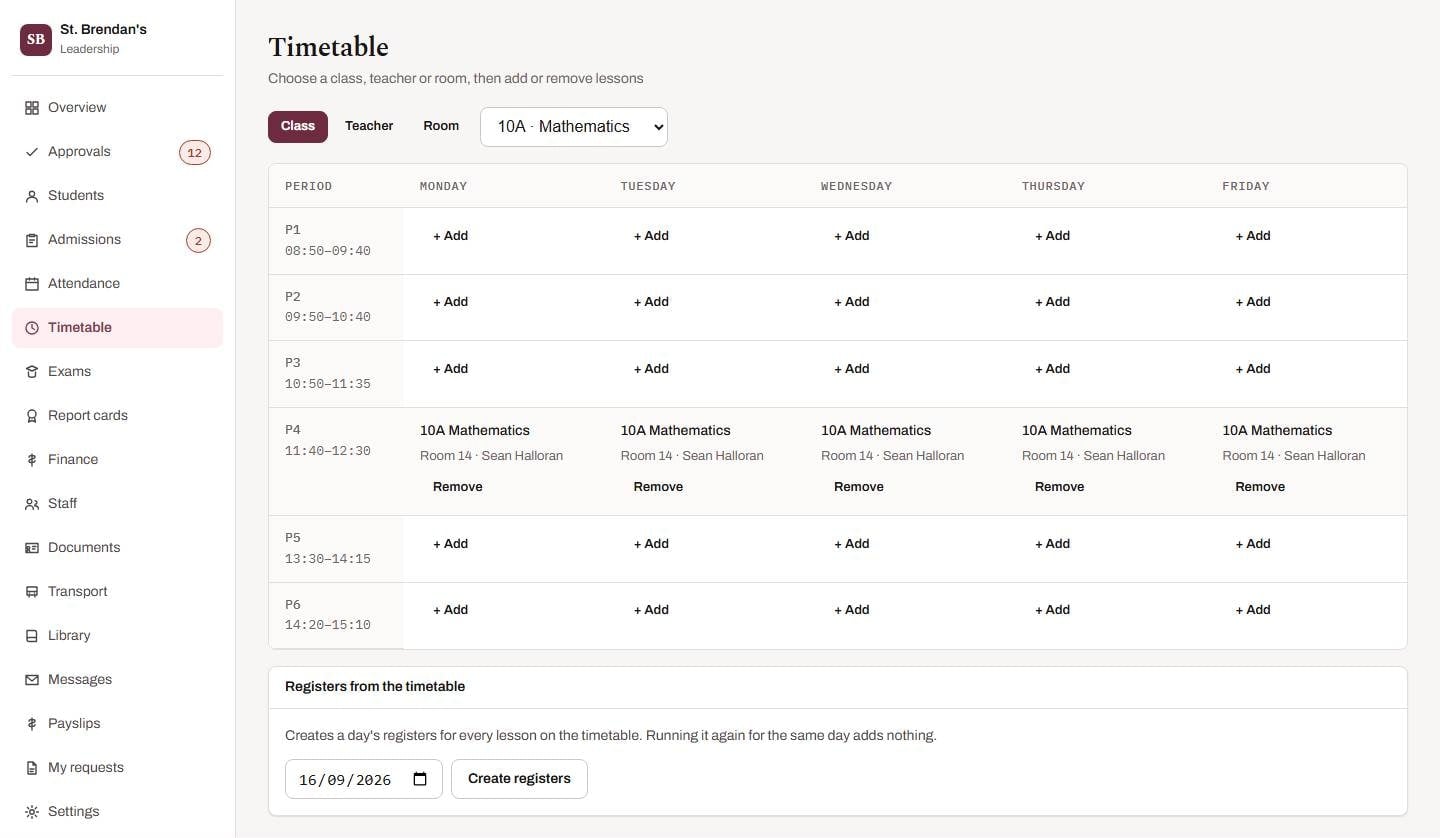
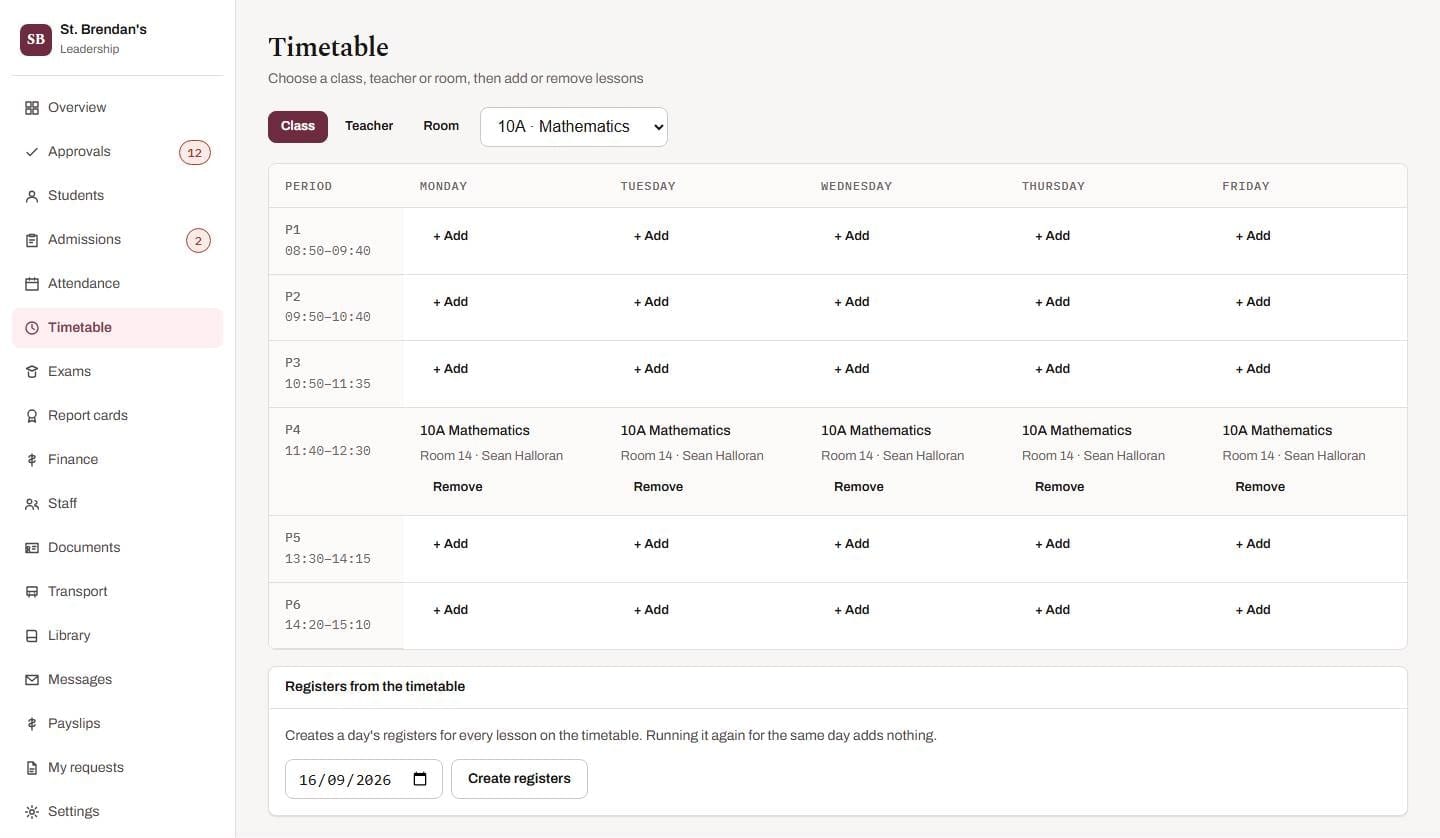
- AcademicsFlow
The week by class. Switch to teacher or room in one click. - AcademicsFlow
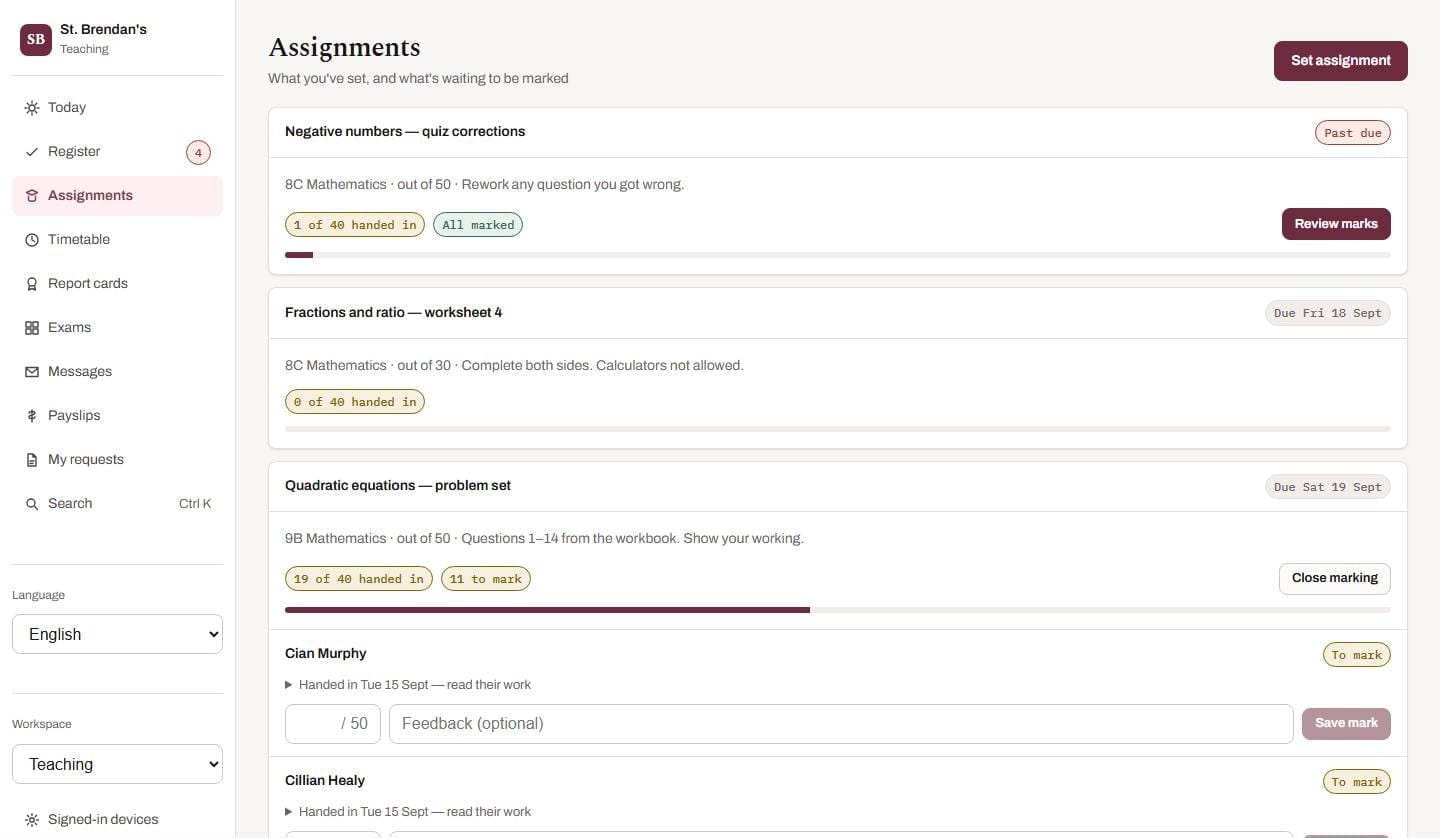
Work handed in, marked and returned with feedback, then used in the term report. - AcademicsFlow
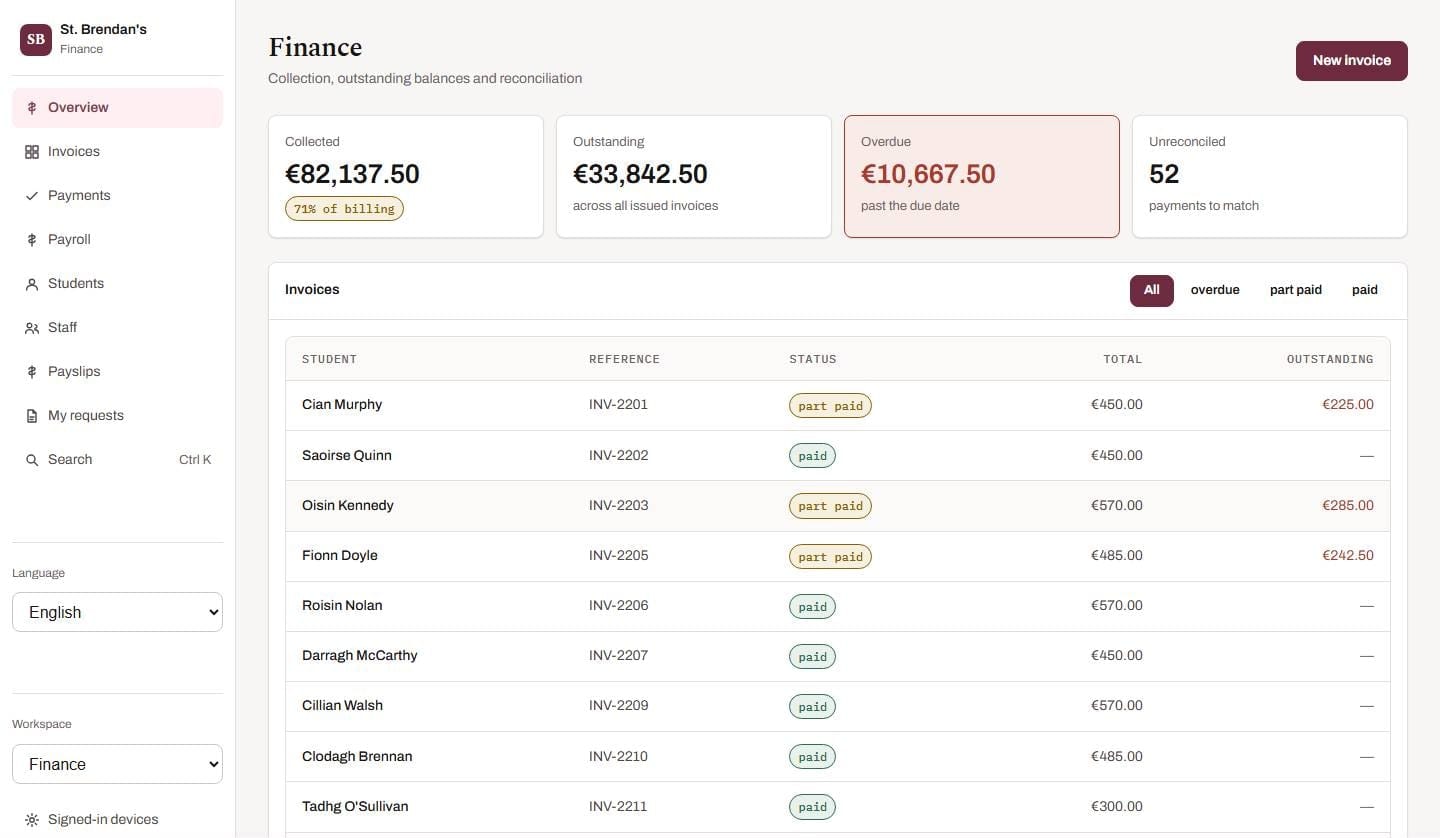
Fees at a glance: collected, outstanding, overdue and unreconciled.
Who benefits
One system, a different view for each person.
College administrators
Run admissions, records, timetable and fees from one system, and approve offers, leave and fee waivers from one queue.
Lecturers and tutors
Take registers from the timetable, set and mark coursework, and write report comments on your own subjects.
Students
See your timetable, hand in work from your phone and read feedback as soon as it is released.
Parents and guardians
Where a college keeps families informed, they see attendance, fees and published reports for their own student only.
Examples
What it looks like in practice.
Illustrative scenarios built from how the product works. They are not customer stories.
A new intake at the start of term
The situation
Applications arrive over the summer, and the office must enrol a cohort into class groups before the first lesson.
How AcademicsFlow helps
Applications move through review and offer, enrolment creates the student and the guardian account, and the timetable shows each class group's week from day one.
Collecting term fees
The situation
Fees are invoiced per student each term, and the finance team spends days matching bank transfers to students.
How AcademicsFlow helps
Invoices carry a status, students or guardians pay through the provider's hosted checkout, and payments reconcile against invoices. Unmatched money shows as unreconciled until cleared.
Tracking attendance across lessons
The situation
A college takes a register at every lesson, and tutors need to see patterns before they become problems.
How AcademicsFlow helps
Registers are generated from the timetable, each student has a day-by-day history, and attendance is shown against the college's own policy.
What is inside
The modules behind it.
Staff, Leave & Payroll
A private staff directory, leave that checks itself, and payroll you finalise on purpose.
Frequently asked questions
Is AcademicsFlow suitable for colleges?
Yes, for colleges that use the same workflow as a school: classes, a weekly timetable, registers, coursework, term reports and fees.
Does it support semesters and credit hours?
Not as part of the standard product. If your college needs credit hours or semester-based course registration, tell us. We will say plainly whether it can be built as custom development.
Does it work for universities?
Not as a whole. Universities typically need course registration, credit-hour structures and transcripts across programmes, which are not part of the standard product. The university management system page explains what does fit.
Can a college collect fees online?
Yes. Families pay through the payment provider's hosted checkout, so card details never reach the college's systems. Each payment is idempotent, so a retry cannot charge twice.
How is it priced for a college?
Colleges pay the same as schools: one plan with every module, priced per enrolled student, in blocks of 100 students. See the pricing page for the exact figure.
Keep exploring
- University Management SystemWhat fits a university today, what does not, and how to scope the rest with us.
- Learning Management SystemHow an LMS differs from school software, and what AcademicsFlow covers for coursework.
- Student Information SystemThe system of record for enrolment, guardians, attendance and grades.
- Fee Management SoftwareInvoices, online payments and reconciliation, with no card data on your servers.
Related reading
See AcademicsFlow running a school like yours.
Book a live walkthrough with a fully populated sample school — or tell us what you need and we'll put together a proposal.
Prefer email? info@academicsflow.com